Connect to platforms and receive without borders
Connect to global work platforms like Rippling, Deel, Upwork, and Fiverr and get paid straight into Ruvo.

How it works
Create a Ruvo account for your CNPJ
Onboard as a Business using your CNPJ number
Complete the KYB flow. Your account is reviewed and approved within 3 days
Locate your Ruvo account details
Locate your Ruvo US-based account details in the Add Money > Add via ACH from US account section
Receive payroll via ACH (1-3 days) or domestic US wire transfer (1 day)
Connect to your payroll platform
Add account / routing numbers into your payroll platform as a withdrawal method

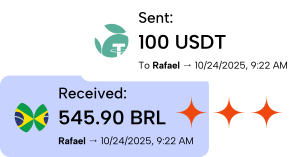
Once landed in Ruvo, send funds to any Pix instantly!
Connect Ruvo to your payroll platform
Ruvo simplifies the complex process of receiving international payments, bridging the gap between global work and instant financial access

Step-by-step
Open Withdrawal methods
In Deel’s sidebar, go to Finance and select Withdrawal methods.
Add a new method
On the Withdrawal Methods screen, click Add method in the top right.
Choose currency and payout type
Pick your country and USD, then select Local bank account (ACH).
Name your payout method
Enter a custom name you’ll recognize — for example, My Ruvo Account.
Copy your Ruvo ACH details
In the Ruvo app, open your USD account and copy your routing number, account number, and account type.
Enter the same details in Deel
Paste your Ruvo values into Deel’s bank form. Double-check that names and numbers match exactly.
Confirm you’re set up
Finish the flow in Deel. You’ll see a confirmation when your Ruvo USD account is ready for payouts.


 For PJs earning abroad
Working internationally opens new opportunities
Working with international clients often means higher pay, better opportunities, and more flexibility.
Better compensation for your skills
Global rates typically exceed what local markets offer for the same work.
More stable, recurring income
International contracts often run longer and more predictably than local projects.
Freedom to work on your terms
You choose clients, projects, and schedules without geographic limits.
What customers love about Ruvo
Hear how Ruvo transforms financial journeys.
No more complicated international money transfers.
Mariana Costa
Remote marketing consultant

Ruvo transformed my international financial workflow completely.
Eduardo Mendes
Global software engineer

Instant crypto transfers changed my business operations.
James Marven
Webflow founder
FAQs
Common questions about connecting payroll platforms to Ruvo